Trust Call: Caller ID & Block
- 0.0
- Rating
- 10.00M
- Installs
- Free
- Price

 Analysis by App-foxy
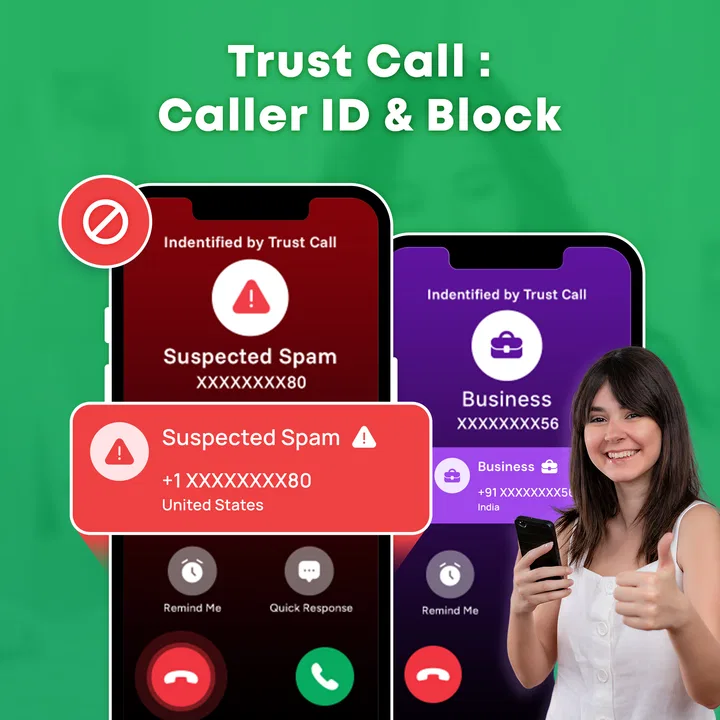
Unknown calls are one of those small daily annoyances that can quickly become a real distraction. A number rings while I am working, eating, or waiting for an important call, and I have to decide whether answering is worth the risk. Trust Call: Caller ID & Block is built for that exact moment. It is a communication app from Maxify Global that combines caller identification with tools intended to help stop unwanted calls.
After spending time with it, I see the appeal immediately: it tries to turn the incoming-call screen into a quick decision point rather than leaving me to guess. The app is free, aimed at everyone, and available for devices running Android 8.0 or later. Its current version is 1.8, and its broad reach—over ten million installs—suggests that this is solving a problem many phone users recognize.
How Trust Call fits into everyday calling
The most useful way to think about Trust Call is not as a replacement for the phone app, but as an extra layer around it. Normal calling tools are good at dialing contacts, showing recent calls, and blocking numbers one by one. They are less helpful when a number is unfamiliar and I need context before deciding what to do. This app focuses its attention on that uncertainty.
You May Also Like

 Blood Strike: 2.5 Anniversary
Blood Strike’s Loadouts Turn Every Drop Into a Tactical Gamble
A close look at Blood Strike’s custom loadouts: how fast access to signature weapons reshapes its battle royale rhythm, rewards preparation, and narrows the gap between fights.

 Pandora - Music & Podcasts
Pandora’s Music Is Easy to Start, but Harder to Recover
Pandora’s strength is its low-effort path from a seed to a station. Its weak spot is how much confidence it asks you to place in connection, setup, and quiet recovery.

 8 Ball Pool
 Is Built on Rivalries, Rematches, and Routine
A close look at the rivalries, rematches, shared routines, and unanswered safety questions that turn a quick pool match into a persistent mobile community.

 Samsung Music
’s Quiet Strength Is Playing What You Already Own
Its reach comes less from spectacle than from dependable access to a personal library. That simplicity is both the app’s strongest retention engine and its ceiling.

 AccuWeather: Weather Radar
AccuWeather Review: A Quick, Clear Forecast for Everyday Decisions
For everyday plans, the best forecast is the one you can understand quickly. AccuWeather makes rain timing, radar, and local conditions easy to act on, with a few trade-offs.

 Hill Climb Racing
Why Hill Climb Racing Still Turns Crashes Into One More Run
A tiny car, a bumpy hill and one more upgrade: Hill Climb Racing keeps resurfacing because its simple chaos makes every near-miss feel personal.
More From Our News Desk



In practice, the value begins before I answer. When an unknown caller appears, identification can help me separate a likely useful call from a nuisance. If the call looks unwanted, blocking gives me a direct way to avoid repeated interruptions. That combination is more convenient than searching the number manually, checking messages, and then returning to the phone screen to deal with it.
I also like the fact that the app targets a very specific problem instead of trying to become a complete messaging or social platform. There is no need to learn a large ecosystem just to handle suspicious calls. The experience is easier to understand when I treat it as a practical filter for incoming phone activity.
That simplicity matters for people who are not especially interested in changing phone settings. Someone who finds built-in blocking menus confusing may prefer having identification and blocking presented together. On the other hand, users who already maintain a carefully managed contact list and rarely receive unknown calls may find the extra layer unnecessary.
What the free price means for the decision
The clearest financial advantage is that Trust Call is free to use. That makes trying it a low-risk decision: I can assess whether it improves my call routine without committing money first. For an app whose usefulness depends heavily on how many unknown or unwanted calls reach a particular phone, free access is especially important because the benefit varies from person to person.
Free does not automatically mean perfect value, though. The real question is whether the app saves enough attention and time to justify keeping it installed. If I receive several questionable calls each week, even a small improvement in deciding what to answer can make the app worthwhile. If almost every call I receive comes from saved contacts, the practical return is much smaller.
I would also approach the free model with sensible expectations. The fact that access costs nothing does not tell me how every identification result will behave in every situation. Unknown numbers can be difficult to classify, and no caller-identification tool should be treated as an absolute guarantee that a call is safe. I still use judgment, especially when a caller asks for personal information, payment, or urgent action.
For that reason, I see Trust Call as a decision aid rather than a security promise. It can reduce friction around suspicious calls, but it should not replace caution. The strongest value comes from combining the app with habits such as refusing unexpected requests, checking official contact channels independently, and avoiding callbacks to numbers that seem questionable.
A realistic day-to-day example
Imagine I am expecting a delivery but do not recognize the number that calls. A normal phone screen gives me limited context, so I might ignore the call and risk missing something useful. With a caller-identification tool in place, I have a better chance of deciding whether the call deserves attention. If the number appears associated with unwanted activity, I can block it instead of waiting for another interruption.
The opposite situation is just as important. Suppose a new medical office, school, repair service, or local business calls from a number I have not saved. An aggressive approach to unknown calls could hide legitimate contacts. Identification helps me avoid treating every unfamiliar number as spam. That is why I prefer a tool that supports a decision rather than one that encourages me to reject every call outside my address book.
There is also a useful evening scenario. Repeated calls from changing numbers can become especially irritating when I am trying to rest. Blocking a known nuisance number is more practical than repeatedly dismissing each call. The benefit is not dramatic in a single moment, but over time it can make the phone feel less intrusive.
Where it improves on ordinary phone tools
Built-in phone apps usually offer basic blocking, but they often make me identify the problem first. That works when one persistent number keeps calling. It is less convenient when I face a stream of unfamiliar numbers and want information before answering. Trust Call’s focus on caller ID and call blocking gives that workflow a clearer purpose.
Manual web searches are another common alternative. Searching an unknown number can occasionally help, but it is slow, inconsistent, and awkward when the phone is ringing. An integrated caller tool is better suited to a time-sensitive decision. I do not have to copy the number, switch apps, examine several results, and then return to the call.
Contact-only screening has a different strength. It can be more predictable because it relies on numbers I already trust. However, it may also be too strict for people who receive legitimate calls from new contacts. Trust Call is more useful when I want some context around unfamiliar callers rather than a simple saved-versus-unsaved rule.
Dedicated paid call-screening services may offer a different level of depth or customization, depending on the service and plan. I would consider those when I need a more specialized workflow and am comfortable paying for it. Trust Call is easier to justify when I want a free starting point focused on the basic problem of recognizing and blocking unwanted calls.
Practical habits that make the app more useful
My first tip is to avoid blocking a number impulsively when I am unsure. If an unfamiliar caller could plausibly be legitimate, I prefer to let the situation develop through a voicemail or an independent follow-up. Blocking is most useful when the pattern is clearly unwanted, not merely unfamiliar.
My second tip is to treat identification as a prompt for verification, not as proof. Even if a caller appears recognizable, I would never share a one-time code, banking detail, password, or identity document solely because the screen provides a name. Caller information can guide my next step, but it should not make me lower my guard.
A third useful habit is to review the effect on important calls. After enabling any blocking workflow, I would pay attention to whether expected calls from new numbers are being missed. This is particularly relevant for job seekers, parents waiting for school calls, patients expecting appointments, and people who work with customers. The best setup is not necessarily the most aggressive one; it is the one that reduces nuisance without cutting off useful contacts.
I also recommend keeping the app’s role narrow in my mind. It is not a replacement for a contact backup, a messaging service, or a general privacy solution. Its job is to help with incoming-call decisions. Keeping that boundary clear makes it easier to judge whether it is helping instead of expecting it to solve every phone-related concern.
Limitations I would consider before installing
The biggest limitation is inherent to caller identification: unfamiliar numbers are not always easy to classify. A legitimate organization may call from a number I do not recognize, while an unwanted caller may use a new number that has little history. That means the app can improve the decision process without making the decision automatically correct every time.
Blocking also has a trade-off. It is satisfying when it stops a persistent nuisance, but it can become inconvenient if I use it without checking the context. People who regularly receive calls from changing numbers should be more cautious than people whose work and personal life run almost entirely through saved contacts.
Another point is that the app’s usefulness depends on how comfortable I am with caller-management tools. Someone who wants a completely hands-off phone may prefer the simplest built-in settings. Trust Call makes more sense for a person willing to glance at caller information and make occasional choices about blocking.
I would also avoid judging it solely by the number of calls it blocks. A good experience can mean fewer false alarms, faster decisions, and less time spent investigating suspicious numbers. In other words, the app’s value is partly measured by reduced uncertainty, not only by visible blocking activity.
Who is most likely to benefit
Trust Call is a strong fit for people who receive frequent calls from numbers outside their contacts. It can also help older relatives or less technical users who find manual number searches and phone settings frustrating, provided someone helps them establish sensible calling habits. The free price makes it easy to test in households where different people have very different levels of call activity.
It is also useful for freelancers, small-business owners, delivery workers, and job seekers who cannot simply ignore every unfamiliar call. These users need a way to distinguish possible opportunities or customers from interruptions. Caller identification is more valuable to them than a rigid rule that rejects every number not already saved.
People who should probably skip it are users who almost never answer unknown calls and already have a satisfactory built-in blocking routine. The same applies to anyone looking for a full communications suite rather than a focused call-management app. Installing another tool will not automatically improve a phone that already handles this narrow task well.
I would be cautious about recommending it as the only defense to someone dealing with serious targeted harassment or complex business call-routing needs. Those situations may require carrier-level help, device controls, or a more specialized paid service. Trust Call is best understood as an accessible everyday layer, not a complete response to every difficult calling problem.
Compatibility and setup expectations
The app supports Android 8.0 and later, so compatibility should be comfortable for many still-used Android phones. That said, an operating-system requirement is only the starting point for a smooth experience. Phone manufacturers sometimes organize call controls differently, and users may need to pay attention to how the app fits alongside existing phone settings.
I would begin with a short trial rather than immediately blocking large groups of calls. During that period, I would observe whether identification appears at the moments I need it and whether important unknown callers remain reachable. This approach makes it easier to adjust my habits without creating a frustrating cleanup later.
Because the app is rated for everyone, its purpose is broad and accessible rather than aimed at a narrow professional audience. That does not remove the need for adult guidance when setting up a phone for a child or an older family member. The most important setup decision is still how aggressively to handle unfamiliar calls.
My verdict on the free call-management value
My overall impression is positive, with a clear boundary around what I expect from it. Trust Call brings together two useful actions—understanding an unknown caller and blocking unwanted numbers—in a form that is easier to reach than a manual search-and-settings routine. Its free price gives it a sensible place on the shortlist for anyone bothered by spam or uncertain calls.
The best reason to try it is reduced hesitation, not blind trust. I like it most when I use the identification result as one piece of context, then apply normal caution before answering, calling back, or sharing information. That balance preserves the convenience without turning a label on the screen into a security guarantee.
Maxify Global has positioned this app around a problem that is simple to describe but surprisingly disruptive in daily life. The experience will be most valuable for people who receive enough unknown calls to make manual handling tiresome. For those users, the combination of caller ID and call blocking can make the phone feel more manageable without requiring a paid commitment.
My buy-or-skip conclusion is straightforward: try it if unfamiliar and unwanted calls regularly interrupt you, especially if you want a free tool before considering paid alternatives. Skip it if your phone already handles unknown callers exactly the way you want, or if you need advanced call-management controls beyond this focused purpose. For everyone in between, I think it is worth a practical trial and a careful look at how it affects both nuisance calls and legitimate contacts.
FAQs for Trust Call: Caller ID & Block
01What is Trust Call: Caller ID & Block used for?
Trust Call: Caller ID & Block is designed to help identify incoming callers and reduce unwanted communication. It can provide information about unknown numbers when available and lets you block calls that appear to be spam, telemarketing, or otherwise suspicious. Its usefulness depends on the quality of its number database, your device permissions, and the availability of caller information in your region.
02Does Trust Call: Caller ID & Block block every spam or unwanted call automatically?
No caller-identification app can guarantee that every unwanted call will be detected or blocked. Trust Call may recognize numbers reported by users or included in its database, but new, spoofed, private, or rapidly changing numbers can bypass detection. Before enabling automatic blocking, review the app’s settings carefully so legitimate business, delivery, or personal calls are not accidentally filtered.
03What permissions does Trust Call: Caller ID & Block require?
The app may request access related to phone calls, contacts, notifications, or device activity so it can identify callers and apply blocking rules. These permissions are important to its main functions, but you should read each request before accepting it. If contact access is optional, consider whether you want to grant it, and review the app’s privacy policy to understand how information is handled.
04Can Trust Call: Caller ID & Block identify private, hidden, or spoofed numbers?
Identification is generally limited when a caller hides their number or uses caller-ID spoofing. A blocked or private number may not provide enough information for the app to match it with a name or reputation record. Even when a number is displayed, the information may be incomplete or outdated. Treat unexpected calls cautiously and avoid sharing sensitive details solely because a caller is identified.
05Is Trust Call: Caller ID & Block free to use, and are there in-app purchases?
Availability of features, advertising, subscriptions, and in-app purchases can vary by platform, country, and app version. Some caller-identification services provide basic tools at no cost while reserving advanced blocking, database access, or ad-free use for a paid plan. Check the current Google Play or App Store listing before downloading, and review renewal terms carefully if a subscription is offered.
Pros
- Identifies many unknown callers before you answer.
- Blocks reported spam and scam numbers automatically.
- Searches phone numbers quickly from the app.
- Simple interface that is easy to navigate.
- Useful call history helps spot repeated unwanted callers.
Cons
- Caller identification may be inaccurate for private or new numbers.
- Some advanced blocking features may require a subscription.
- The app may need access to calls and contacts to work fully.
- Spam databases can vary by country and region.
- Background protection may increase battery and data usage.

Trust Call: Caller ID & Block
Gallery